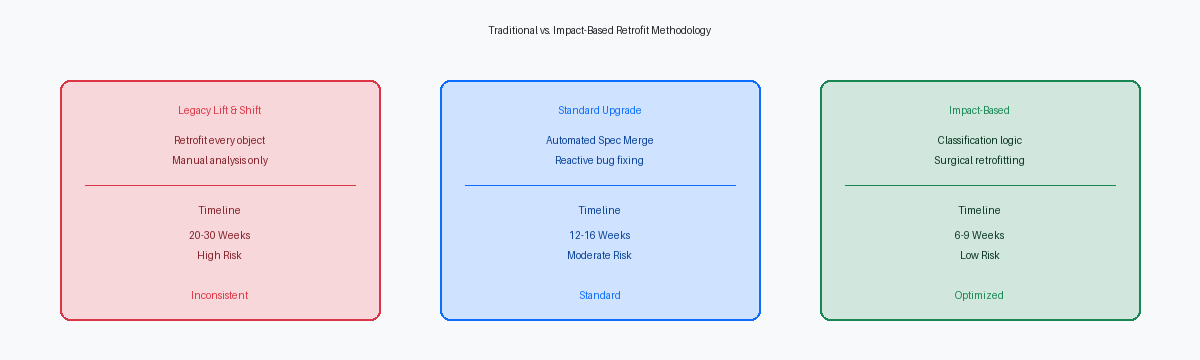

A JD Edwards EnterpriseOne upgrade is one of the most strategic IT projects an organization can undertake. Done right, it modernizes core business processes, reduces operating costs, and unlocks years of pent-up technical debt. Done wrong, it can disrupt operations for months and put the entire ERP investment at risk.
The difference between the two outcomes is rarely about technology. It is about methodology. After many JDE upgrade projects across manufacturing, distribution, and retail, the pattern is always the same: the projects that succeed are the ones where custom code is analyzed properly before development starts.
This guide explains exactly how to do that, with the same framework we use on real-world enterprise upgrade engagements.
Why JDE Upgrades Fail (and How to Avoid It)
The single biggest source of risk in any JD Edwards EnterpriseOne upgrade is uncontrolled custom code. A typical mature JDE installation accumulates between 10,000 and 12,000 custom objects over its lifetime — applications, reports, business functions, business views, tables. Most of these objects have outlived their original developers. Documentation is partial or missing. Naming conventions have drifted. And nobody really knows which custom objects are still in use, which are duplicates of standards, and which would actually break if Oracle changed something in the next release.
When upgrade teams ignore this complexity and dive straight into development, the project balloons. Estimates double. Testing finds endless regressions. Go-live slips by quarters.
The right approach is the opposite: spend serious time on the assessment phase, classify every custom object, and only then plan the development work. Done correctly, the development phase of a JDE upgrade can be compressed into 6 to 9 weeks, even on enterprise-scale repositories.
The Custom Object Analysis Methodology
The methodology rests on a simple but powerful principle: not every custom object needs to be re-developed during an upgrade. Most can be backed up and re-applied automatically. Only a small fraction — the truly impacted ones — require manual retrofit work.
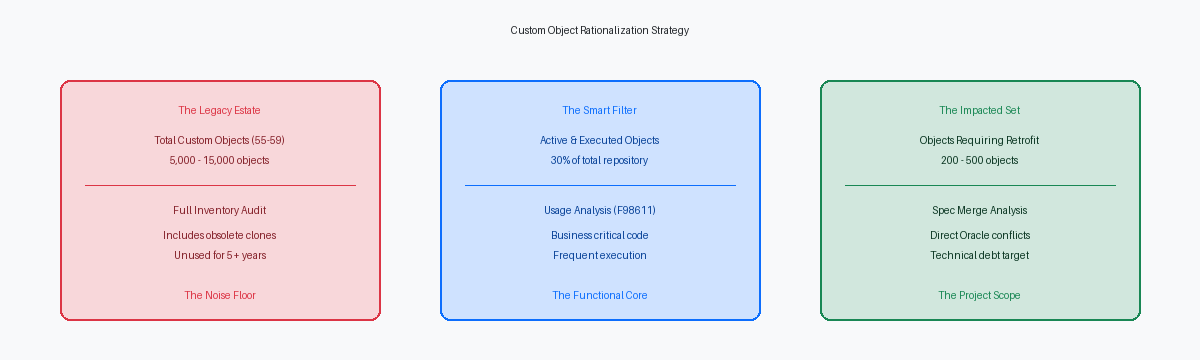
Here is how the analysis flows:
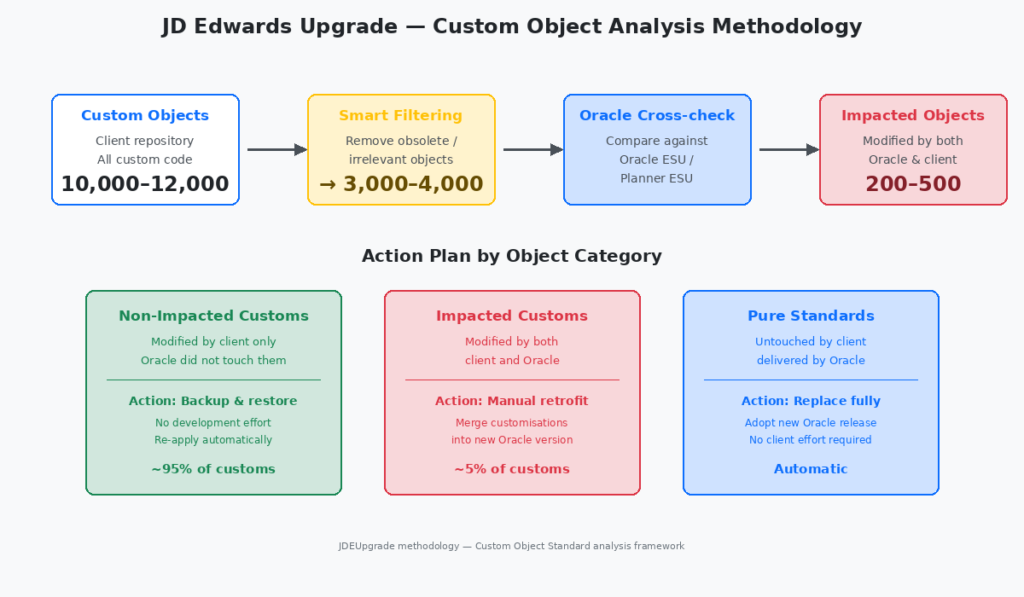
The four stages of the analysis are:
Stage 1 — Inventory. Extract the full repository of custom objects from the client environment. Typical volume: 10,000–12,000 objects.
Stage 2 — Smart filtering. Remove obsolete objects, duplicates, abandoned development branches, and objects that have been superseded. This step alone reduces the working set to 3,000–4,000 objects — roughly two-thirds smaller.
Stage 3 — Oracle cross-check. Compare each remaining custom object against Oracle’s net changes (ESU, Planner ESU, Tools Release deltas) for the target version. The output: which Oracle standards have actually changed between the source and target releases.
Stage 4 — Impact classification. The final filter identifies the objects modified by both the client and Oracle. These are the truly impacted ones — typically only 200 to 500 objects out of the original 10,000+.
The Three Categories of Custom Objects
Once the analysis is complete, every custom object falls into one of three categories, and each category has a different action plan.
Non-impacted custom objects (~95% of the working set). These are objects modified by the client but not touched by Oracle in the new release. The action is mechanical: back them up before the upgrade, restore them after. No manual development effort. This is where the methodology pays back — most of the custom code never enters the development critical path at all.
Impacted custom objects (~5% of the working set). These are the objects modified by both client and Oracle. They require manual retrofit: the developer reviews Oracle’s changes, understands what the new standard does, and merges the client’s customizations into the new version. This is the bulk of the actual development work.
Pure standards. Objects that the client never modified. These are simply replaced by the new Oracle release. Zero client effort.
The fact that only 200–500 objects out of 10,000+ require manual work is what makes a 6-to-9-week development phase realistic. Without this filtering, the same upgrade would take 6 to 9 months.
A Realistic Development Timeline
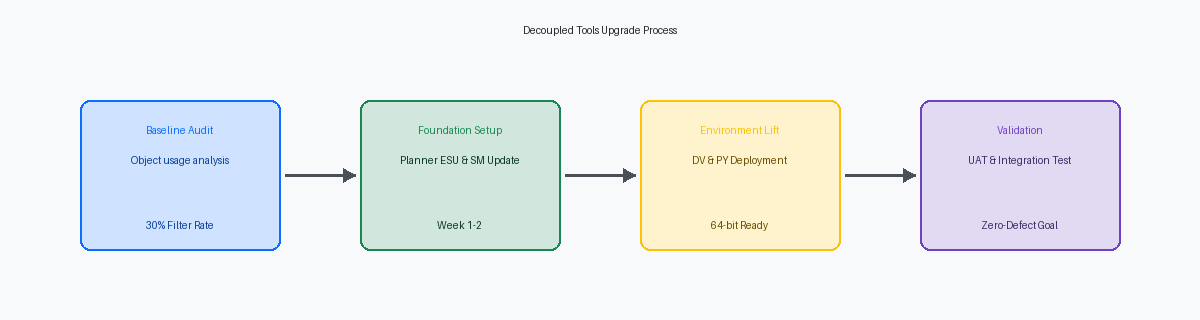
Here is what the development phase of a well-planned JDE upgrade looks like in practice:
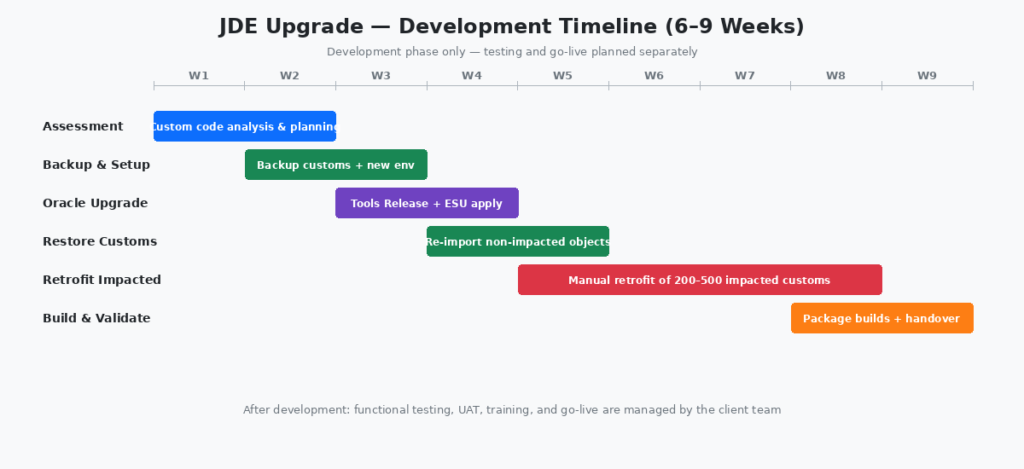
Note that this timeline covers only the development phase. Functional testing, user acceptance testing, end-user training, and go-live activities are managed separately by the client team and follow their own schedule. The development phase delivers the upgraded codebase ready for testing.
The phases overlap deliberately. Backup and environment setup begin as soon as the assessment is far enough along. The Oracle upgrade itself (Tools Release plus ESUs) starts before assessment is fully closed. And the longest phase — the manual retrofit of impacted objects — runs in parallel with everything else for several weeks.
What to Do Before Starting
Before kicking off a JDE EnterpriseOne upgrade project, three preconditions must be in place.
A clear inventory of the source environment. This means knowing exactly which version of EnterpriseOne and which Tools Release the client is running today, what database and middleware support them, and what integrations are in place with third-party systems.
A defined target architecture. Decide upfront whether the upgrade is purely a version jump on the existing infrastructure, or whether it includes a platform change — moving to Oracle Cloud Infrastructure, AWS, or Azure. Mixing these decisions during execution is a recipe for slippage.
Executive sponsorship. A JDE upgrade touches every functional area of the business. Without a sponsor at C-level who can resolve cross-departmental conflicts quickly, the project will stall the first time finance and operations disagree on testing priorities.
Common Mistakes to Avoid
Even with a solid methodology, JDE upgrade projects can go off the rails. The most common mistakes:
Skipping the assessment phase to “save time.” This always costs more time later. The 1–2 weeks of upfront analysis save months downstream.
Treating all custom objects as equal. A custom report used by three users five years ago does not deserve the same effort as a daily-run business function in the order-to-cash flow.
Underestimating the testing window. Even with a clean development phase, the client team needs adequate time for functional testing, regression testing, and user acceptance. Rushing this phase causes go-live failures.
Mixing scope changes with the upgrade. New features, new modules, and new integrations should be deferred to a follow-up project. The upgrade itself should be a like-for-like migration to the new release.
Conclusion
A JD Edwards EnterpriseOne upgrade is not a leap into the unknown. With the right methodology — proper custom object analysis, smart filtering, and a clear separation between impacted and non-impacted objects — the development phase becomes predictable, fast, and low-risk.
The 6-to-9-week development window is achievable on enterprise-scale repositories, even with 10,000+ custom objects, because the vast majority of those objects never need manual rework.
If you are planning a JD Edwards EnterpriseOne upgrade and want to discuss how this methodology applies to your environment, our certified consultants are ready to help.