
Treating an OCI move as a simple “lift and shift” is the fastest way to blow a migration budget. While exiting the cycle of three-year SAN refreshes and hardware maintenance is a primary driver, the technical success of a step-by-step JD Edwards migration to Oracle Cloud Infrastructure hinges on optimizing the virtualized stack rather than just replicating it. In my experience, moving from legacy on-premise arrays to OCI NVMe-backed block volumes consistently yields 10–15% performance gains in UBE processing, provided the VCN is architected to maintain sub-5ms latency between the logic and database tiers.
The primary constraint for enterprise clients isn’t the application code—it is the cutover window for multi-terabyte databases. Migrating a 4TB production environment requires a move away from traditional backup-and-restore methods if you intend to keep business downtime under 12 hours. Utilizing OCI Data Guard or GoldenGate for near-real-time synchronization allows for a surgical cutover that protects data integrity. This transition moves the focus from managing physical iron to fine-tuning AIS Server throughput and Orchestrator scalability, ensuring the infrastructure matches the capabilities of the latest Tools Release.
Architecting the OCI Virtual Cloud Network for JDE
A flat network is a security debt you will pay for during your first audit. For a standard JDE footprint on OCI, you must implement a hub-and-spoke VCN architecture. The hub VCN handles common services like DNS, bastion hosts, and the Dynamic Routing Gateway (DRG), while spokes isolate the Production, Non-Production, and Shared Services environments. This prevents a misconfiguration in a DV920 environment from creating a lateral path into your PD920 data.
Security lists and Network Security Groups (NSGs) must enforce a strict “deny all” default. Your Database and Logic tiers—including the Enterprise Server and Deployment Server—belong exclusively in private subnets with no direct internet access. Only the OCI Load Balancer or specific HTML/AIS servers should sit in a public or DMZ subnet. Placing the Deployment Server in a private subnet requires a Bastion or a VPN/FastConnect connection, but it eliminates the 22/3389 port exposure that remains a primary vector for ransomware in legacy on-premises setups.
Provisioning OCI Load Balancing (LBaaS) is the most efficient way to manage traffic across multiple HTML instances without the overhead of managing third-party appliances. By configuring SSL termination at the load balancer level, you move the decryption workload away from the WebLogic Managed Servers. This reduces CPU utilization on your web tier by 15–20% during peak login periods, such as Monday morning voucher entry or payroll processing, and centralizes certificate rotation to a single point in the OCI Console.
The pipe between your data center and OCI dictates your migration timeline and post-go-live latency. A standard 1Gbps Site-to-Site VPN is sufficient for daily transactional traffic, but it often struggles with the initial multi-terabyte data migration, frequently yielding actual throughput closer to 400–600 Mbps due to overhead. Upgrading to a 10Gbps FastConnect reduces a 2TB database upload from roughly 15 hours to under 2 hours. This bandwidth is critical if you plan to use OCI for real-time reporting via One View Reporting or heavy AIS-based integrations where sub-10ms latency is the requirement for a responsive user experience.
Choosing between VM migration and clean installs
Oracle Cloud VMware Solution (OCVS) serves as the primary option for organizations running on-premise VMware clusters with legacy OS versions, such as Windows 2012 R2, that are no longer natively supported as OCI Compute images. By moving existing VMDKs directly into an OCVS SDDC, you maintain full root access to the hypervisor and bypass the OS refactoring phase, which typically shrinks the migration timeline by roughly a third to nearly half. This is the fastest route for an “as-is” move, especially if the current Tools Release is below 9.2.5 and the business isn’t ready for a platform refresh.
If the project mandate includes moving to 64-bit JD Edwards, a clean install on OCI Compute instances is non-negotiable. This method allows you to shed technical debt by installing a fresh OS and the latest 64-bit Tools Release components. During this process, every custom BSFN must be recompiled on the target OCI instances to ensure absolute compatibility with the specific processor architecture, whether you select E4 (AMD) or X9 (Intel) shapes. I have seen projects stall during UAT because teams attempted a binary copy of the spec and bin directories; a full “Build and Deploy” of server packages is the only way to avoid memory violations in high-volume UBEs.
Storage performance is the most common bottleneck when moving from high-end on-premise SANs to the cloud. To prevent performance degradation in the General Ledger and Sales Order modules, set the Block Volume performance level to “Higher Performance” (20 VPUs per GB) for the mount points housing the F0911 and F4211 data files. This provides the 50,000+ IOPS necessary to handle massive transactional bursts. Without this specific configuration, a 10,000-line journal entry post that took 4 minutes on-premise can easily balloon to 15 minutes on a standard “Balanced” tier disk, immediately eroding user confidence in the new OCI environment.
Data migration strategies for large JDE databases
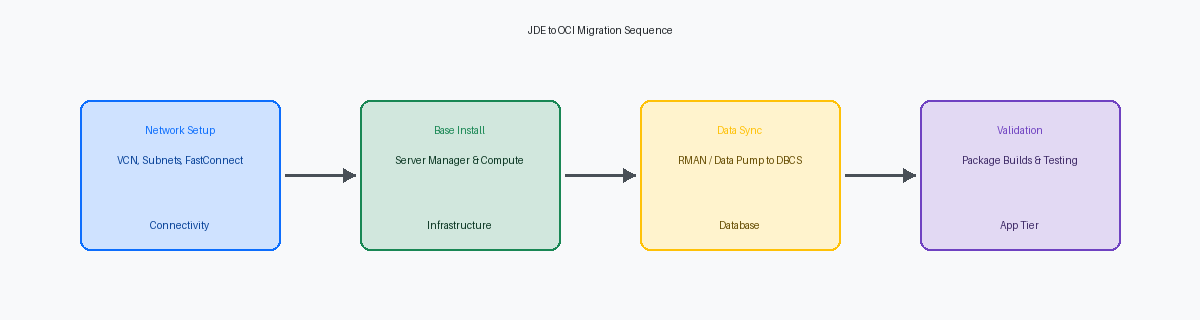
Moving a JDE database exceeding 2TB requires a departure from standard logical exports if you intend to hit a 48-hour weekend cutover window. Using RMAN with multi-section backups and direct compression to OCI Object Storage allows for parallelized data transfer that saturates the available FastConnect bandwidth. In a recent migration of a 4.5TB production environment, we achieved a reduction in backup time of more than half by configuring section sizes of 256GB, ensuring no single large datafile bottlenecked the process. This approach moves the bulk of the data days before the cutover, leaving only the archive logs for the final synchronization.
Organizations with zero tolerance for extended maintenance windows should deploy Oracle Data Guard to maintain a near-real-time standby on OCI. By establishing a physical standby, the final cutover is reduced to a simple role transition, typically completed in under 30 minutes regardless of total database size. This eliminates the risk of data loss and provides a built-in fallback mechanism if the application tier validation fails. This is the standard path for high-volume distribution environments where JDE kernel processes cannot afford more than a four-hour window for the entire infrastructure stack.
Re-platforming from SQL Server or DB2 to Oracle Database Cloud Service (DBCS) introduces more technical friction than a like-to-like migration, necessitating the use of Data Pump. The critical work resides in the tablespace mapping; JDE’s traditional PRODDTA and PRODCTL schemas must be aligned with OCI’s block storage architecture to prevent I/O hotspots. Migrating to DBCS at this stage automates the lifecycle management of the JDE database, specifically the quarterly patching and point-in-time recovery cycles that usually consume four to six hours of a DBA’s week. Using the Extreme Performance package within DBCS also enables RAC, providing the high availability required for global JDE instances serving multiple time zones.
Moving the JDE application and logic tiers
Server Manager Console deployment on a dedicated OCI instance is the non-negotiable first step of the logic tier migration. Without the console active in the target VCN, you cannot push the Server Manager Agent to your new Enterprise and HTML nodes, stalling the provisioning process. Attempting to point OCI-based agents back to an on-prem console over a high-latency VPN results in constant “Zombie” status alerts. Establishing the console in the cloud allows for clean discovery and management of the new architecture from day one.
Central Objects must transition early, specifically the F98770 and F98771 tables, to enable package builds on the new OCI-based build machine. You cannot rely on legacy packages built for on-prem hardware. A fresh full package build on the OCI Enterprise Server is the only way to verify that C compilers and linker settings are correctly mapped to the target OCI shapes. This step typically takes 4 to 8 hours depending on object count but is the primary gatekeeper for functional testing in the new environment.
AIS and Orchestrator Studio configurations require a surgical update to reflect internal OCI DNS entries and Load Balancer IP addresses. A significant portion of post-migration integration failures, typically between 10% and 20%, stem from AIS discovery services still pointing to decommissioned on-prem hostnames. For Media Objects (MTRs), move the files to OCI File Storage Service (FSS). This provides a scalable, shared mount point across all HTML instances, eliminating the need for manual file replication and ensuring that a user uploading a document on one web server can access it instantly on any other node in the cluster.
Executing the cutover with minimal business impact
A 48-hour weekend cutover window is the standard for enterprise JDE environments, yet it fails if you treat the final sync as a cold start. We use a Pilot Light approach where the OCI target is 100% staged, patched, and smoke-tested two weeks before the go-live date. This reduces the weekend workload to a final database delta sync and a refresh of the F98611 and F986110 tables. By the time Friday 6:00 PM hits, the only variables should be the data transfer speed and the final package build for any last-minute emergency ESUs.
Network latency and DNS propagation are the silent killers of a clean cutover. One week before the migration, you must reduce the DNS TTL (Time to Live) for all JDE-related URLs to 300 seconds. If you leave it at the default 86,400 seconds, you will spend the first day of production troubleshooting connectivity issues that are actually just stale records pointing to decommissioned on-prem hardware. During the cutover, we verify the load balancer configs to ensure the AIS and HTML instances are responding across the new OCI VCN subnets before the first user logs in.
The final data sync often overlooks the volatile tables that can paralyze a system if brought over in a dirty state. You must validate the F00095 object reservation table during the final quiet period to ensure no orphaned locks from the on-prem session survive the transition. Leaving a record in F00095 for a critical Batch Header means users will face “Record Reserved” errors on non-existent transactions. We also truncate the F986113 to prevent OCI from attempting to resume subsystem jobs that were initiated on the old architecture.
Post-migration validation is not a generic login check; it requires running heavy-hitting UBEs like R42565 (Invoicing) or R42520 (Pick Slip) to stress-test the OCI compute shapes. For one multi-billion dollar distributor, we found that while the web tier felt snappy, batch performance on the R42565 was approximately 15% slower until we adjusted the multi-threaded queue settings and tuned the OCI Block Volume IOPS. Running a representative sample of 500–1,000 invoices immediately after the database sync provides the empirical evidence needed to sign off before the Monday morning shift begins.
Performance tuning and governance on OCI
Most projects fail to optimize storage performance, leaving volumes at the default “Balanced” setting. For the JDE database tier, specifically the data and redo log volumes, toggle the Block Volume Performance Units (VPU) to the “Higher Performance” tier (20 VPU per GB). This adjustment provides up to 75 IOPS per GB, which is critical during heavy UBE batch runs or high-concurrency periods like month-end close.
OCI Observability and Management tools replace legacy monitoring by surfacing inefficient SQL execution plans directly within the JDE database. Instead of manual trace analysis, the Database Management service identifies long-running queries from custom reports or AIS orchestrations that deplete the buffer cache. This visibility allows for precise indexing or code refactoring before performance degrades for the end-user.
Configuring auto-scaling for the HTML tier ensures responsiveness during peak loads without over-provisioning. Define a scaling policy based on CPU utilization thresholds—typically triggering a new instance when the pool average hits 70% for five minutes. This prevents web server hangs common in static environments when a surge of users hits the system simultaneously, such as during Monday morning logins.
Cloud governance requires a tagging strategy to prevent sprawl from inflating the monthly bill. Every resource, from Compute instances to Load Balancers, must carry cost tracking tags to differentiate between Production, DR, and Sandbox environments. This data feeds the OCI Cost Analysis dashboard, allowing finance to report the exact burn rate of the JDE ecosystem by business unit.
The shift to OCI network topology necessitates a revision of JDE.INI and JDBJ.INI settings. Adjust the ‘Connection Timeout’ parameters to account for virtualized network latencies. Setting the JDBJ connection timeout to 60 seconds and aligning the JDE.INI [NETWORK QUEUE SETTINGS] ensures that transient network blips do not result in orphaned kernels or dropped user sessions.