
For organizations running JD Edwards EnterpriseOne, the transition to the latest Tools Release or a major application update is no longer a luxury—it is a necessity for maintaining Oracle Premier Support and leveraging the latest digital transformation features like Orchestrator and UX One. However, the most significant hurdle in any technical migration is the JD Edwards EnterpriseOne upgrade methodology custom code retrofit process. Historically, these projects have been viewed as multi-month or even multi-year endeavors that drain internal resources and inflate budgets.
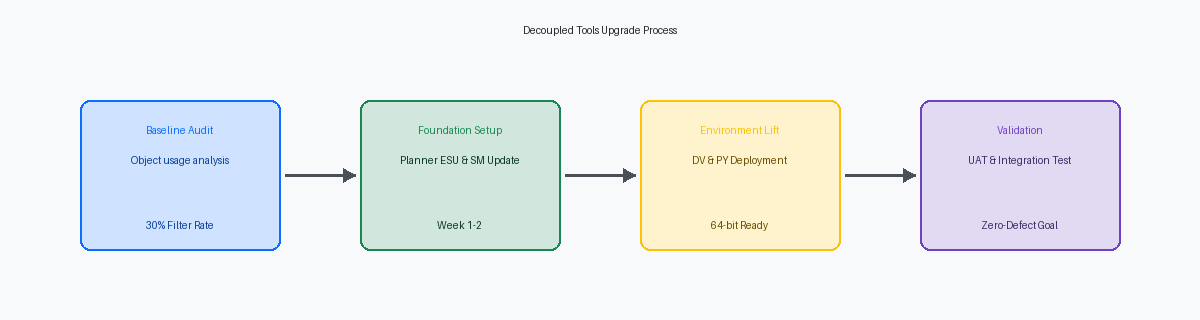
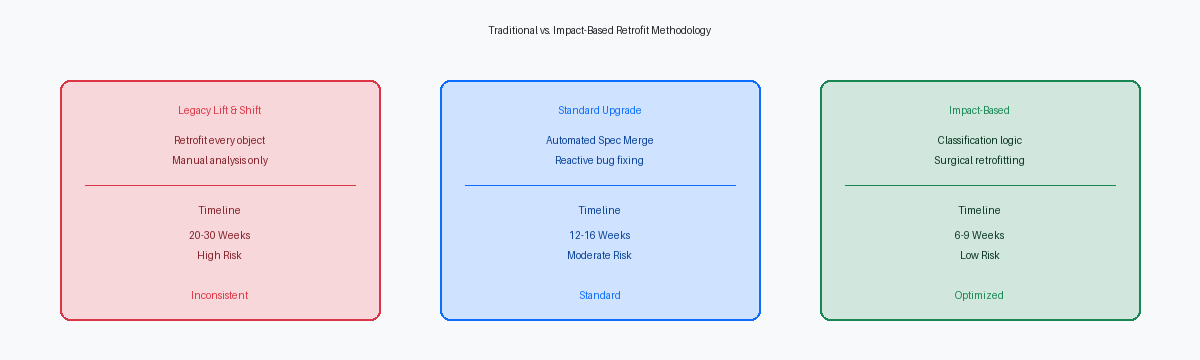
The complexity arises not from the platform installation, but from the thousands of custom objects—cloned reports, modified business functions, and altered table structures—that must be evaluated, merged, and tested. To remain competitive, IT directors must move away from the “lift and shift” mentality. By adopting a proprietary methodology focused on object classification, organizations can effectively reduce the development and retrofit window to a predictable 6 to 9 week timeframe.
The Technical Debt Bottleneck in JDE Upgrades
Most JDE instances that have been in production for over a decade carry significant technical debt. This debt is comprised of modifications made to address functional gaps in older versions of EnterpriseOne that may now be addressed by standard functionality. In a traditional upgrade approach, developers often attempt to retrofit every single modification that exists in the current environment. This is a fundamentally flawed strategy.
When you treat every custom object with equal priority, you waste approximately 40% to 60% of your development budget on code that is either redundant, obsolete, or non-impacted by the target release. The key to an accelerated timeline is a rigorous impact analysis performed before the first Spec Merge begins. This analysis determines which objects require manual intervention and which can be promoted with minimal effort.
Defining the JD Edwards EnterpriseOne Upgrade Methodology Custom Code Retrofit
A modern JD Edwards EnterpriseOne upgrade methodology custom code retrofit relies on a binary classification system: Impacted vs. Non-Impacted objects. This classification is driven by comparing the central objects of the source environment against the target release’s pristine objects.
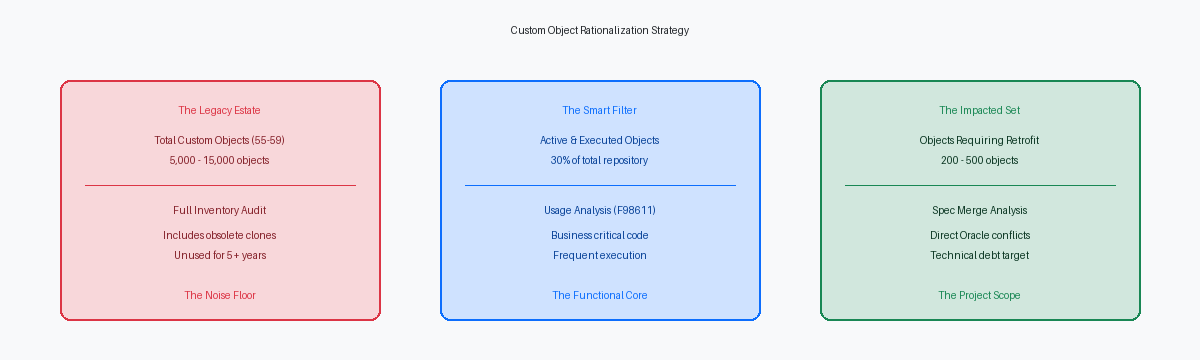
Non-Impacted objects are typically custom-developed objects (55-59 range) that do not call business functions or tables that have undergone structural changes in the new release. These can often be moved forward via a standard Object Management Workbench (OMW) project with only basic validation. Impacted objects, conversely, are those where the base Oracle code has changed in the target release, or where a custom modification resides within a standard JDE object that has been updated. These require a deep-dive “Visual Compare” and manual code integration to ensure the modification survives the upgrade without breaking new standard logic.
The Object Classification Framework
To achieve a 6 to 9 week retrofit cycle, the classification must be automated. We utilize specialized tools to generate an object delta report. This report categorizes the environment into three distinct buckets:
1. Redundant/Obsolete: Objects that haven’t been executed in 18+ months or are replaced by new standard features (e.g., replacing a custom report with an E1 Search or a CafeOne layout).
2. Simple Retrofit: Custom objects that require a simple re-build and re-generation of global table specs.
3. Complex Retrofit: Base JDE objects (like P4210 or P4310) where heavy customization meets significant Oracle base code changes.
By eliminating the first bucket and automating the second, the development team can focus 100% of their specialized skills on the third bucket. This surgical focus is what enables the compressed timeline that CIOs require for modern business agility.
Executing the Retrofit: The Sprint Model
Once the objects are classified, the execution follows a structured sprint model. Rather than a monolithic development phase, we break the retrofit into functional workstreams (e.g., Distribution, Finance, Manufacturing). Each workstream follows a specific technical workflow: Spec Merge, Manual Retrofit, and Unit Testing.
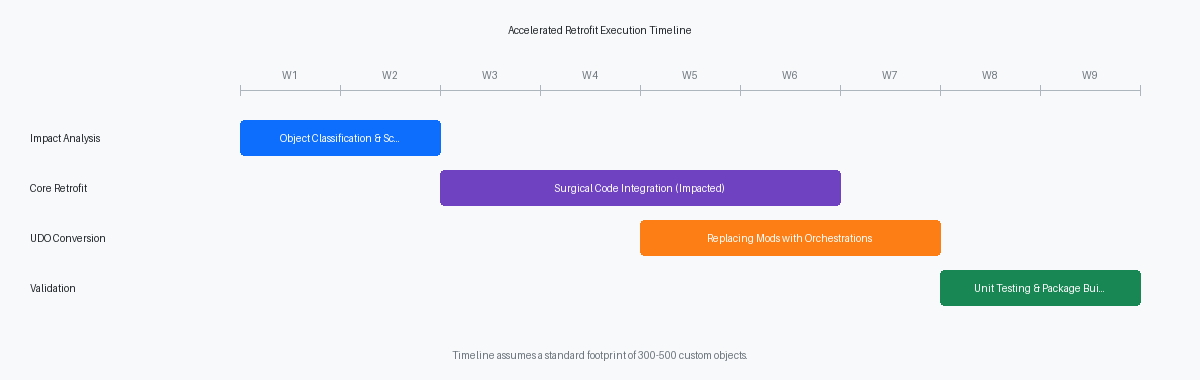
During the Spec Merge, the system attempts to merge custom code into the new specifications. However, any conflict in the C-business functions or complex Event Rules (ER) will flag the object for manual review. Our methodology emphasizes a “Clean Core” approach. If a modification can be moved out of the base code and into an Orchestration or a Form Extension, we perform that transition during the retrofit phase. This not only speeds up the current upgrade but significantly reduces the effort for all future Tools Release updates.
Reducing Development Time to 6-9 Weeks
Achieving a 6 to 9 week development window is a matter of resource allocation and scope management. In a typical environment with 300 to 500 modified objects, a disciplined methodology reveals that only about 100 to 150 are truly “impacted” by the upgrade.
By deploying a team of senior JDE developers who specialize in Visual Compare and ER Compare tools, the manual retrofit of these 150 objects can be completed in approximately 4 to 5 weeks. The remaining weeks in the 9-week cycle are dedicated to automated integrity testing and resolving issues found during the initial data conversion. This approach prevents the “testing loop” where developers are constantly fixing code during User Acceptance Testing (UAT), which is the primary cause of project delays.
Risk Mitigation and Quality Assurance
The greatest risk in a JD Edwards EnterpriseOne upgrade methodology custom code retrofit is the introduction of regressions. To mitigate this, our methodology includes a mandatory “Unit Test Script” for every impacted object. Developers must prove that the custom logic functions correctly alongside the new standard features before the object is promoted to the QA environment.
Furthermore, we leverage the Object Tracking capabilities within JDE to monitor which objects are being used in the weeks leading up to the upgrade. If an object was marked for retrofit but shows zero usage in the production logs, it is moved to a “low priority” queue, further de-risking the critical path of the project.
Future-Proofing Your JDE Environment
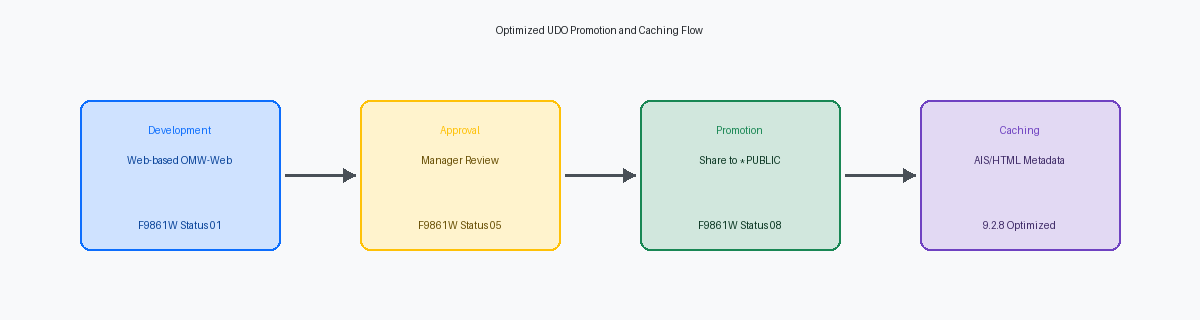
An upgrade is the ideal time to evaluate the long-term sustainability of your customizations. As part of the retrofit methodology, we advocate for the “de-customization” of the environment. With the advent of User Defined Objects (UDOs), many legacy modifications can be replaced with non-intrusive configurations.
For example, custom grid formats, specialized lookups, and even some complex logic previously handled by C-business functions can now be managed via the Orchestrator. By moving logic into the Orchestrator layer, you effectively insulate your business processes from the underlying JDE base code, making future “Continuous Delivery” updates a matter of days rather than weeks.
Conclusion: A Data-Driven Path to 9.2 and Beyond
Successfully executing a JD Edwards EnterpriseOne upgrade methodology custom code retrofit requires a shift from manual, exhaustive labor to data-driven, surgical intervention. By classifying objects into impacted vs. non-impacted and focusing development resources exclusively on high-value code, organizations can realize a fully retrofitted environment in just 6 to 9 weeks. This efficiency allows IT leadership to redirect their budgets toward innovation rather than mere maintenance.
If your organization is planning an upgrade and you are concerned about the complexity of your custom code, it is time to move beyond traditional methodologies. Contact us today to schedule a free consultation and learn how our proprietary impact analysis can streamline your path to JDE 9.2 and the latest Tools Release.