
Decoupling the foundation from the house is the only way to maintain a modern ERP without the fatigue of a multi-year project. For organizations running JDE 9.2, the traditional ‘Big Bang’ upgrade is dead. Oracle’s continuous delivery model means the JD Edwards EnterpriseOne Tools Release upgrade benefits roadmap is now a standalone strategic lever. You no longer need to touch your finance or manufacturing logic to gain the advantages of 64-bit processing, enhanced security protocols, or the latest Orchestrator features. If you are still treating a Tools Release like a major version upgrade, you are overspending and moving too slowly.
In my experience leading dozens of enterprise migrations, the companies that thrive are those that update Tools every 12–18 months. This keeps technical debt manageable and ensures that when a critical security patch or a mandatory browser update hits, the system doesn’t break. We aren’t just talking about stability; we are talking about the ability to stop writing custom C-code Business Functions (BSFNs) and start using Logic Extensions and Orchestrations to solve business problems.
Why Decouple the Tools Release from Application Upgrades?
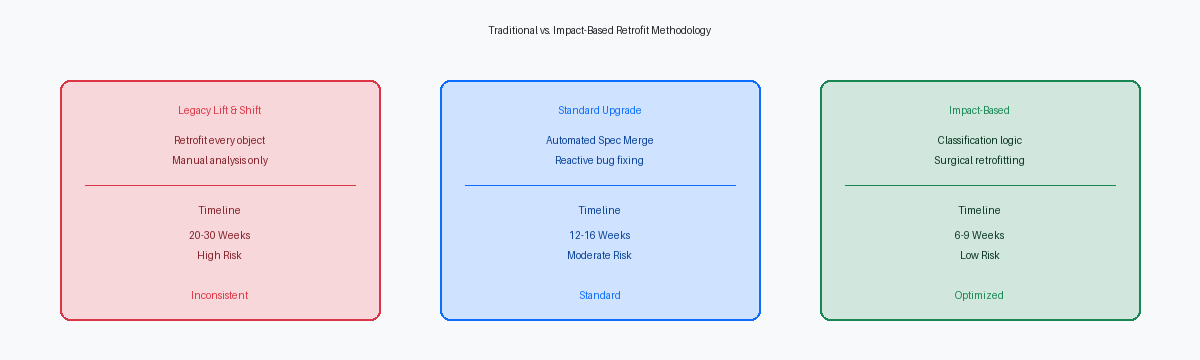
The primary reason to separate these efforts is risk containment. An application upgrade (e.g., moving from 9.1 to 9.2) involves data conversion, extensive functional testing, and a heavy retrofit of the customization estate. A Tools Release upgrade is a technical lift of the foundation—the AIS, the HTML servers, and the Enterprise Server kernels. When you decouple, you can move to the latest Tools Release (such as 9.2.8) in a 6-to-9-week window, rather than a 6-to-9-month marathon.
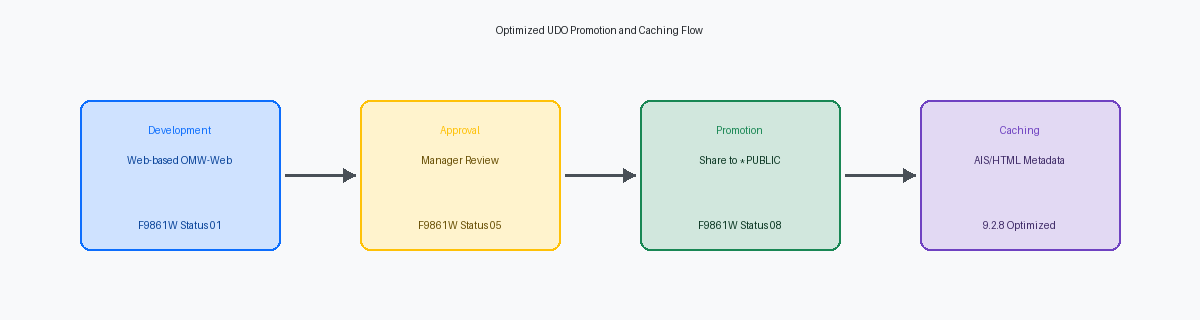
Since Oracle has extended Premier Support for JDE 9.2 through at least 2034, the pressure to move to a new major version has vanished. Instead, the focus has shifted to the ‘9.2.x.x’ line. By staying current on Tools, you gain access to User Defined Objects (UDOs) that allow business analysts to modify form layouts and create notifications without a single line of code or an OMW project. This shift reduces the load on your development team by nearly a third in a mature environment, as simple UI changes no longer require a package build.
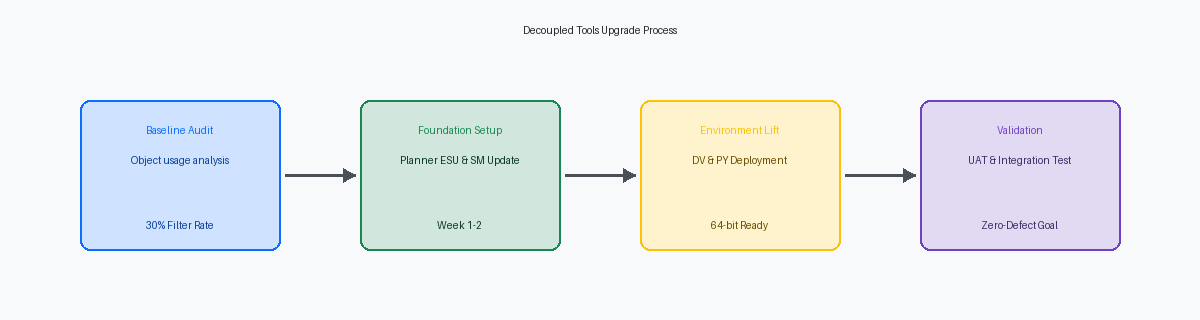
Technical Drivers for the Latest Tools Release (9.2.8)
If you are running a Tools Release older than 9.2.5, you are likely still managing a 32-bit architecture. The move to 64-bit is no longer optional for those looking at future-proofing. Oracle has moved its development focus entirely to the 64-bit stack, and third-party vendors (database, OS, and Java) are following suit. Upgrading to 9.2.8 provides the performance overhead needed for high-volume AIS (Application Interface Services) traffic, which is the backbone of modern JDE integrations.
Beyond the architecture, the Orchestrator Studio has evolved from a simple macro recorder into a capable integration engine. In recent releases, features like Logic Extensions allow you to execute complex business logic—traditionally locked inside BSFNs or UBEs—directly within an Orchestration. This means you can validate data or perform calculations on the fly without modifying the underlying JDE source code. For a senior IT Director, this translates to a cleaner repository and faster future upgrades because the logic exists in the UDO layer, not the object layer.
The Financial Case: Reducing the Customization Estate
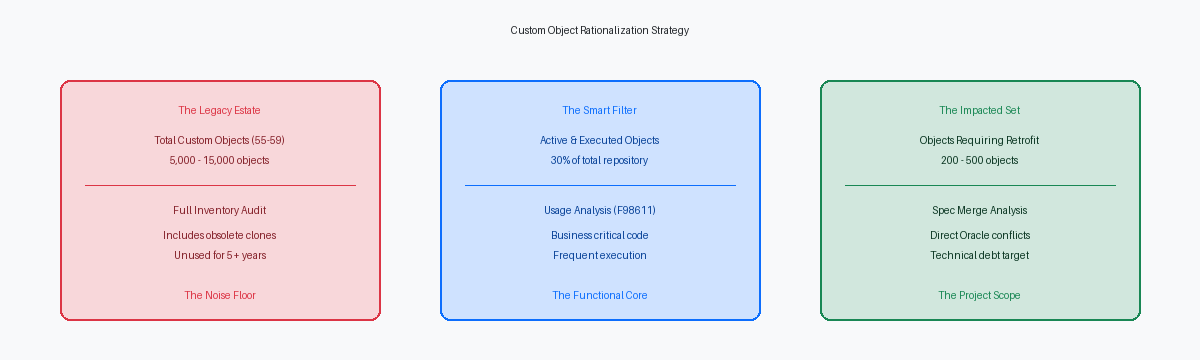
A typical enterprise JDE installation has 5,000–15,000 custom objects in the repository. However, after applying a filter to remove obsolete code and duplicates, we often find that only a quarter to a third of that estate is actually in use. When you execute a Tools Release upgrade, the impact on these objects is minimal. In a well-scoped project, we typically see only 200–500 truly impacted objects that require any level of retrofit.
By following a structured technical roadmap, you can systematically replace ‘hard’ customizations with UDOs. For example, instead of a custom BSFN to handle a third-party API call, you use an Orchestration. This moves the maintenance burden from the developer to the business analyst. Over a 3-year cycle, this transition can reduce external development spend by approximately a quarter. You aren’t just upgrading software; you are re-platforming your custom logic to a more sustainable model.
A 9-Week Roadmap for a Tools Release Upgrade
A disciplined roadmap is the difference between a smooth weekend go-live and a Monday morning disaster. The process begins with the Planner ESU. I have seen more projects stalled by skipping the latest Planner ESU than by any other single technical error. This ESU ensures the environment’s management tools are compatible with the new metadata you are about to inject.
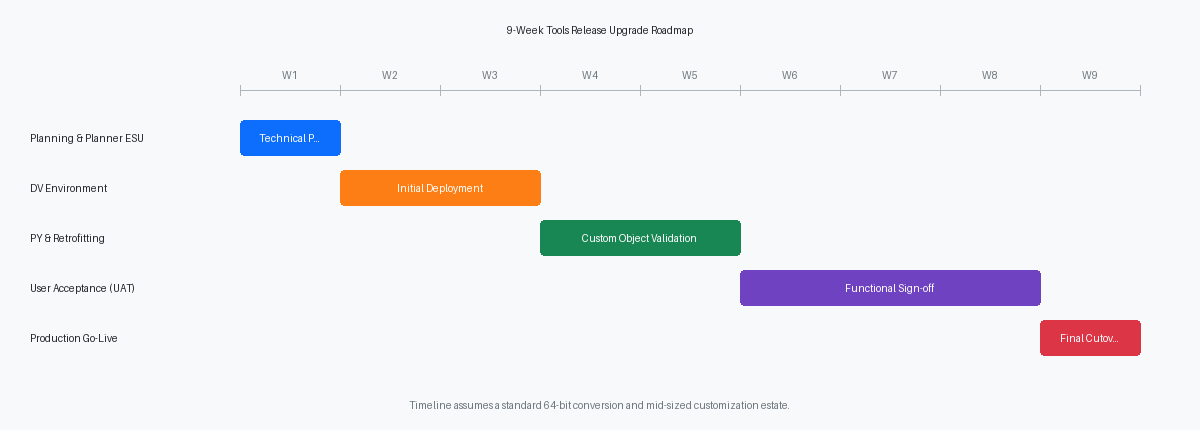
Once the Planner ESU is in place, the technical team moves through the environments: DV (Development), PY (Prototype), and finally PD (Production). The ‘heavy lifting’ occurs in weeks 3 and 4, where the 64-bit conversion (if not already completed) and the multi-foundation setup allow for side-by-side testing. This ensures that your production environment remains stable while the technical team validates the new Tools Release in a sandbox. Testing should focus heavily on integrations and high-volume UBEs, as these are the areas most sensitive to kernel changes.
Managing the Risk: Planner ESUs and Server Manager Readiness
Server Manager is often the forgotten component of a Tools upgrade, yet it is the most critical for lifecycle management. Before touching the Enterprise Server, Server Manager itself must be upgraded to the latest version to support the management of the new Tools Release agents. This allows for centralized configuration and monitoring, which is vital when you are troubleshooting the new AIS or HTML server instances.
Risk mitigation also involves a strict ‘Code Freeze’ during the PY and PD phases. Because a Tools Release affects the runtime engine, introducing new custom code during the upgrade introduces variables that make troubleshooting nearly impossible. I recommend a 4-week code freeze for any objects that touch the JDE kernel or core BSFNs. This discipline ensures that any issues found during UAT (User Acceptance Testing) are attributable to the Tools Release itself, not a rogue developer modification.
Infrastructure Modernization and the OCI Path
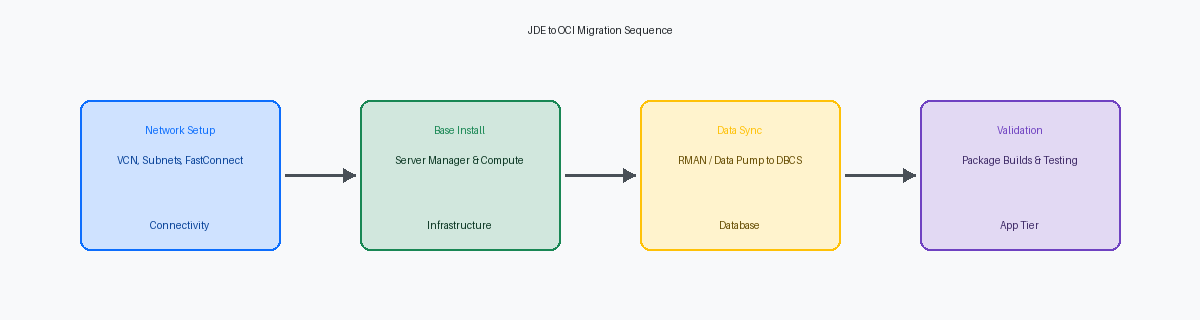
Many CIOs use a Tools Release upgrade as the catalyst for moving to Oracle Cloud Infrastructure (OCI). If you are currently running JDE on-premises or in a legacy data center, the latest Tools Releases are optimized for OCI’s automated provisioning tools. Features like ‘One-Click Provisioning’ and ‘Environment Self-Service’ are only available if your Tools Release is current.
Moving to OCI while upgrading Tools allows you to exit the hardware refresh cycle entirely. In a cloud environment, scaling your HTML servers or AIS nodes to handle seasonal peaks takes minutes, not weeks of procurement. If your roadmap includes AI or machine learning, being on the latest Tools Release in OCI is a prerequisite, as Oracle’s digital assistant and autonomous database integrations are built specifically for this stack. Adopting a consistent technical roadmap ensures your organization remains agile enough to respond to business demands without the friction of technical debt.
Ready to define your specific roadmap and see how the latest Tools Release can eliminate your custom code burden? Schedule a free technical assessment with our senior team to review your current object usage and build a 9-week execution plan.